

How to Tell the Difference Between an iPhone 13 and iPhone 14
The iPhone 13 and iPhone 14 look very similar at first glance. Both have a 6.1-inch Super Retina XDR display, flat aluminum sides, a glass back, Face ID, Lightning charging, MagSafe support, and two rear cameras arranged diagonally. If the phone is in a case, it can be difficult to tell which model you are holding just by looking at it.
The most reliable way to tell the difference is to check the model name or model number in Settings. Physical inspection can also help, but it is not always enough because the standard iPhone 13 and standard iPhone 14 share the same general shape and size. This guide explains the quick checks, the small hardware differences, and what to inspect when buying used.
Quick answer
To identify the phone quickly, open Settings, choose General, then About. The Model Name field should say iPhone 13 or iPhone 14. If you need to verify it further, tap the Model Number field to show the model number that begins with the letter A. For Canadian models, iPhone 13 is commonly A2631 and iPhone 14 is commonly A2881.
If you cannot access Settings, inspect the SIM tray region, camera details, colour, and repair history. Those checks can help, but they are secondary. A phone with replacement parts, a case, or a changed housing can be harder to identify from the outside.
iPhone 13 vs iPhone 14 at a glance
| Feature | iPhone 13 | iPhone 14 |
|---|---|---|
| Year introduced | 2021 | 2022 |
| Display | 6.1-inch Super Retina XDR OLED | 6.1-inch Super Retina XDR OLED |
| Processor | A15 Bionic with 4-core GPU | A15 Bionic with 5-core GPU |
| Rear cameras | 12MP Wide and 12MP Ultra Wide | 12MP Main and 12MP Ultra Wide |
| Front camera | 12MP TrueDepth camera | 12MP TrueDepth camera with autofocus |
| Video features | Cinematic mode up to 1080p at 30 fps | Cinematic mode up to 4K HDR at 30 fps, Action mode |
| Safety features | Emergency SOS | Emergency SOS, Crash Detection, Emergency SOS via satellite where supported |
| Battery rating for video playback | Up to 19 hours | Up to 20 hours |
| Common Canadian model number | A2631 | A2881 |
Compare available iPhone 13 and iPhone 14 options
After checking the main differences, compare current used inventory by model, storage size, condition, colour, and price.
Check the model name in Settings
The Settings app is the simplest check. Open Settings, then General, then About. Look for Model Name. If the phone is a standard iPhone 13, it should say iPhone 13. If it is a standard iPhone 14, it should say iPhone 14.
This is better than guessing from the camera shape or colour. The iPhone 13 and iPhone 14 are close enough visually that the model name is the cleanest answer. If you are inspecting a used phone before purchase, ask the seller to show this screen in person.
Also check storage on the same page. Both models were sold in 128GB, 256GB, and 512GB versions. Storage does not identify the model, but it affects price and resale value.
Check the model number
The model number is useful when the phone was sold in another country or when you want a more exact check. In Settings, General, About, tap Model Number. The part number will switch to an A-number. Apple uses different A-numbers for different regions.
For iPhone 13, Apple lists A2482 for the United States, A2631 for Canada, Japan, Mexico, and Saudi Arabia, and other model numbers for other regions. For iPhone 14, Apple lists A2649 for the United States, A2881 for Canada, Guam, Japan, Mexico, Saudi Arabia, and the U.S. Virgin Islands, and other model numbers for other regions.
If the phone is from Canada, A2631 points to iPhone 13 and A2881 points to iPhone 14. If the phone was imported, compare the A-number with Apple's model list instead of assuming based on the SIM tray or colour.
Look at the SIM tray
In Canada and many other regions, both iPhone 13 and iPhone 14 have a physical SIM tray on the left side. In the United States, the standard iPhone 14 has no physical SIM tray, while the iPhone 13 has one. That can be a useful visual clue for U.S. models, but it is not a reliable difference for Canadian models.
If you are buying in Canada, do not use the SIM tray alone to identify the phone. A Canadian iPhone 14 can still have a physical SIM tray. Use Settings and the model number instead.
Compare the colours
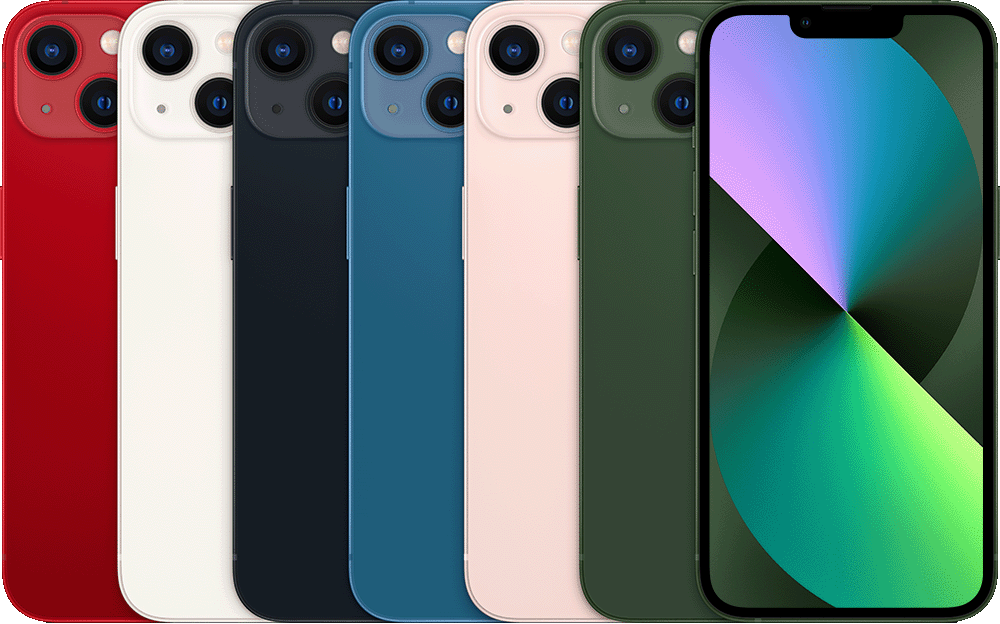
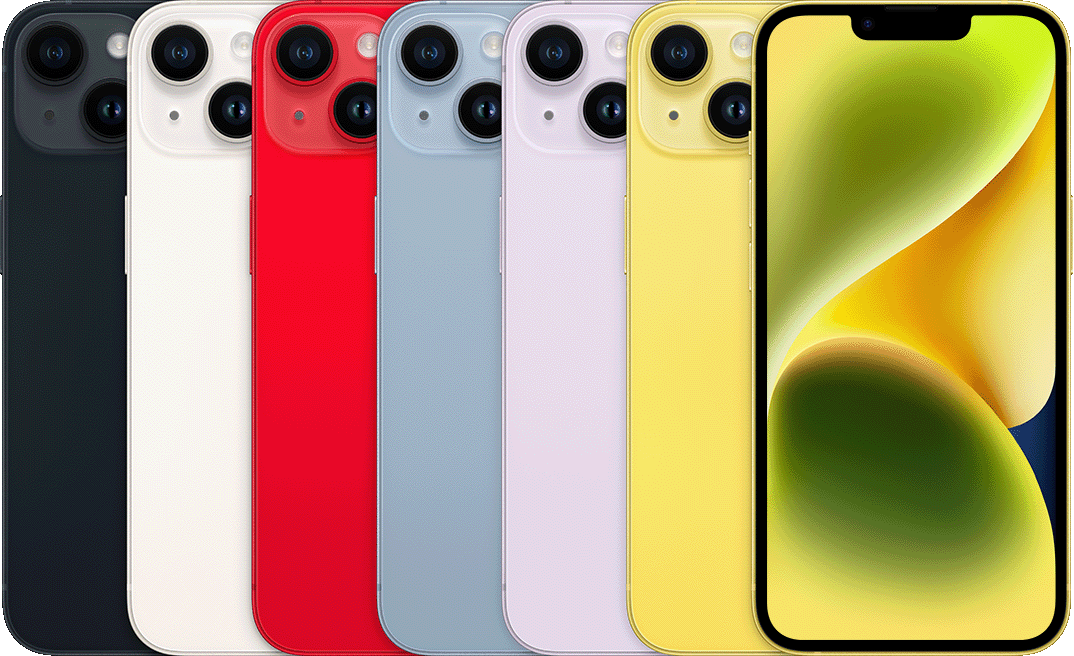
Colour can help, but it is not perfect. iPhone 13 was sold in (PRODUCT)RED, starlight, midnight, blue, pink, and green. iPhone 14 was sold in midnight, starlight, (PRODUCT)RED, blue, purple, and yellow.
Green and pink point toward iPhone 13. Purple and yellow point toward iPhone 14. Midnight, starlight, red, and blue exist on both lines, so those colours do not identify the model by themselves. Also remember that cases, skins, replacement housings, and lighting can make colour checks less useful.
Check the camera features
Both phones have two rear cameras, so the number of lenses does not separate them. The iPhone 14 has newer camera processing and a different main camera setup. It adds Photonic Engine support, Action mode for video, Cinematic mode up to 4K HDR at 30 fps, and a TrueDepth front camera with autofocus.
A practical test is to open the Camera app and look for Action mode in video. Action mode is an iPhone 14 feature, not an iPhone 13 feature. You can also check Cinematic mode settings. iPhone 13 supports Cinematic mode up to 1080p at 30 fps, while iPhone 14 supports Cinematic mode up to 4K HDR at 30 fps.
Camera settings can be changed, and iOS versions can move menus around, so this should not replace the model number check. It is still useful if you are comparing two phones side by side.
Compare performance
Both models use the A15 Bionic chip, but not the exact same version. iPhone 13 has an A15 Bionic with a 4-core GPU. iPhone 14 has an A15 Bionic with a 5-core GPU. In normal use, both phones still feel similar. Messaging, browsing, social apps, photos, video playback, banking apps, and maps run well on either model when the battery and storage are in good condition.
The iPhone 14 has a small performance advantage in graphics-heavy tasks and may feel a little more capable with video features. For most everyday buyers, the difference is not dramatic. Battery condition, storage, screen condition, and price are often easier to notice than the processor difference.
Check battery expectations
Apple rates iPhone 13 for up to 19 hours of video playback and iPhone 14 for up to 20 hours. The iPhone 14 also has slightly higher ratings for streamed video and audio playback. On a used phone, actual battery life depends heavily on battery health, age, charging habits, temperature history, and how the phone was used.
If you are buying used, do not assume an iPhone 14 will always outlast an iPhone 13. A healthy iPhone 13 battery can be better in daily use than a worn iPhone 14 battery. Check Settings, Battery, Battery Health & Charging, then compare maximum capacity and service messages.
Check safety features
iPhone 14 added Crash Detection and Emergency SOS via satellite where supported. The iPhone 13 does not have those same features. These features are not always visible from the outside, but they are useful differences if you are choosing between the two models.
If safety features are part of your buying decision, iPhone 14 is the better choice. If your main use is calling, messaging, photos, browsing, and apps, iPhone 13 may still be enough if the price and condition are better.
iPhone 13 and iPhone 14 physical similarities
The standard iPhone 13 and standard iPhone 14 are close in size. Both have a 6.1-inch display, flat sides, Ceramic Shield front glass, a glass back, and an aluminum frame. They also use the same general button layout, Lightning connector, Face ID notch style, and MagSafe accessory system.
The iPhone 14 is slightly thicker and slightly lighter, but the difference is small enough that it is not a practical identification method for most buyers. Do not rely on feel alone unless you already know the phones very well.
Do iPhone 13 cases fit iPhone 14?
Some cases may look like they fit both phones, but case fit is not a good way to identify the model. Small differences in thickness, camera placement, button alignment, and case tolerances can affect fit. A flexible case may fit well enough even if it was not designed for that exact model.
If you are buying accessories, choose a case that specifically lists your model. If you are identifying the phone, use Settings instead of a case.
Used buying checklist
If you are buying an iPhone 13 or iPhone 14 used, start with model verification. Open Settings, General, About, and confirm the model name, storage, and model number. Then check battery health, screen condition, cameras, Face ID, speakers, microphones, charging, wireless charging, buttons, and cellular service.
Also check for iCloud lock, carrier restrictions, unpaid device balance, and parts and service history where available. If the screen or battery has been replaced, ask what type of part was used. A lower price can still be reasonable, but the condition should match the price.
If you are comparing options, browse our used iPhone collection and check each listing for model, storage, battery condition, cosmetic condition, and included accessories.
Which one should you choose?
Choose iPhone 13 if the price is lower and the condition is good. It still has a strong OLED display, good cameras, 5G, MagSafe, Face ID, and enough performance for normal daily use. It is especially reasonable if battery health is strong and you do not need the newer safety and camera features.
Choose iPhone 14 if the price difference is small, if you want Crash Detection or Emergency SOS via satellite, if video features are important, or if the iPhone 14 has better battery condition. The iPhone 14 is not a completely different phone, but it is the newer model with several useful upgrades.
Shop used iPhone 13 and iPhone 14 inventory
Compare current listings, storage sizes, colours, conditions, and prices before choosing between the two models.
Final thoughts
The easiest way to tell the difference between an iPhone 13 and iPhone 14 is to check Settings, General, About. The model name and A-number are more reliable than visual inspection. In Canada, A2631 commonly identifies iPhone 13 and A2881 commonly identifies iPhone 14.
Visually, the two phones are very close. Colour, SIM tray, and camera features can help, but they should be used as supporting checks. For buying used, confirm the model first, then compare battery health, storage, screen condition, repair history, and price.