

Updated November 7, 2026. Apple announced the next Apple Creator Studio update on October 27 and says it will arrive on the App Store this November. The features described below are announced, not necessarily available on every device today; check the current App Store requirements before subscribing or buying a Mac.
Apple's upcoming Creator Studio update adds tools to Final Cut Pro, Logic Pro, Pixelmator Pro and its productivity apps. For someone shopping for a used Mac, the useful question is whether the update requires a new computer. It does not have one answer. Some apps can run on a compatible Intel Mac, while Logic Pro for Mac and several new intelligence features need Apple silicon. The operating-system version is another separate requirement.
What is changing in November?
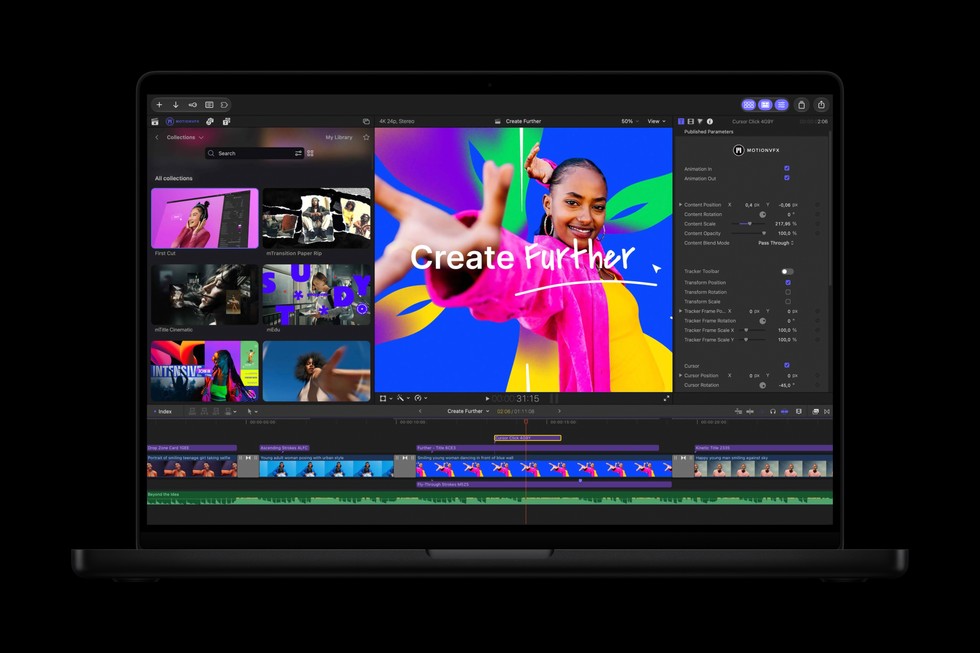
Apple says its November Creator Studio release will add built-in MotionVFX content and a video-asset Content Hub to Final Cut Pro, an updated Browser and Stem Splitter in Logic Pro, and Generate Fill in Pixelmator Pro. It also announced assistants in beta for Logic Pro, Keynote, Pages and Numbers. These are different types of feature: editing assets, application changes and AI-assisted functions do not necessarily share one hardware requirement.
Apple describes the update as free for existing Creator Studio subscribers. In Canada, it lists the subscription at C$17.99 per month or C$179 per year for new subscribers, with a one-month free trial. The listed pricing and terms can change, so confirm them at checkout. You do not need to buy a new Mac merely to subscribe. Apple advertises a separate three-month promotion for eligible new Mac or iPad purchases; do not assume a used or refurbished purchase qualifies for that promotion.
Can an Intel Mac run the updated Final Cut Pro?
Apple's October announcement says the Creator Studio version of Final Cut Pro for Mac requires macOS 26.6 or later and can run on a Mac with Intel or Apple silicon. Some features require Apple silicon. That makes an eligible Intel Mac a possible Final Cut Pro machine, not a guarantee that every new function will work or that an older Intel model can install the required macOS release. Check the exact model's supported operating systems before relying on it.
For a used Mac buyer, the distinction between launching the app and using a specific feature is important. A listing that says “supports Final Cut Pro” does not establish that it supports a particular MotionVFX effect, AI tool or export workflow. Ask what work you actually need to do, then verify the relevant feature and operating-system requirements on Apple's current documentation. If your projects are large, performance, memory and storage capacity also affect the editing experience even when the app technically opens.
What about Logic Pro and Pixelmator Pro?
Apple says the updated Creator Studio version of Logic Pro for Mac requires Apple silicon and macOS 26.1 or later. An Intel Mac is therefore not a suitable purchase if that version of Logic Pro is the main reason you are buying. Its newly announced intelligent assistant has a further requirement: macOS 27 on an Apple Intelligence-capable Mac, and Apple says the beta is available in U.S. English only. A used M1-or-later Mac may meet the Apple Intelligence hardware rule, but you should also confirm that its exact model can run macOS 27 and that the feature is available in your language.
Pixelmator Pro for Mac has a different minimum in Apple's announcement: macOS 26 or later on Intel or Apple silicon, with some features requiring Apple silicon. Apple has announced Generate Fill for the November update, but do not assume that a compatible Intel installation will provide every function without checking the feature-specific note when the update arrives. If your use is basic photo editing rather than Generate Fill, compare a suitable used Mac's display, memory and storage against your existing workflow before paying more for a newer chip.
Motion and Compressor also have their own requirements. Apple lists Motion at macOS 15.6 or later in the announcement's footnotes, and Compressor at macOS 15.6 or later on Intel or Apple silicon, with some features needing Apple silicon. These details illustrate why “Creator Studio compatible” is too broad a label for a used-computer listing.
Do the new Keynote, Pages and Numbers assistants work on older Macs?
Apple says the beta assistants for Keynote, Pages and Numbers require macOS 27 and an Apple Intelligence-capable device. Its current Apple Intelligence support page lists Mac models with M1 or later among eligible Macs. The assistant beta is limited to U.S. English. That means an Intel Mac may still run versions of the productivity apps, but it should not be bought for those specific assistants. Apple separately says the new Model Context Protocol support for those apps requires macOS 27; it is a different requirement from the AI-assistant hardware rule.
The ordinary versions of Keynote, Pages, Numbers and Freeform remain available for free, according to Apple. Do not confuse a subscription's premium content or intelligence features with basic access to the apps. If you mainly write documents or make spreadsheets, the subscription may not be necessary at all. Try the free apps and identify a subscriber-only tool you would actually use before including the subscription in your computer budget.
Which used Mac is the safer choice?
Start with a written list of the apps and features you need. For Final Cut Pro editing without Apple-silicon-only features, an eligible Intel model might work, provided it can install macOS 26.6. For the current Creator Studio Logic Pro, choose an Apple-silicon Mac that can run macOS 26.1 or later. For the announced assistants, verify macOS 27 support, Apple Intelligence eligibility and the stated language limitation. A Mac with M1 or later is the general Apple Intelligence hardware baseline, but not every M1 machine has identical memory, storage, ports or performance.
On a listing, confirm the exact model year and chip in About This Mac. Check the installed macOS version and Apple's compatibility list for the version you need. Ask about memory, SSD size, battery condition on a MacBook, and the return policy. Video libraries and project files can consume substantial storage, and buying the least expensive eligible configuration may leave too little working space. Our refurbished-laptop specifications guide explains the broader trade-offs.
It is also worth separating application compatibility from speed. An M1 Mac that runs an app can still take longer than a newer model to render complex effects or manage large projects. Conversely, a recent Mac will not make every Creator Studio feature available before Apple's November rollout. If you are comparing the newest professional laptops, our M6 and PROLED MacBook Pro comparison covers that hardware choice separately.
Bottom line
You do not need the newest Mac to use every part of Apple Creator Studio. An eligible Intel Mac can run some of the suite, including Final Cut Pro, but the updated Logic Pro requires Apple silicon and the announced assistants require an Apple Intelligence-capable device with macOS 27. Choose a used Mac for the specific app and feature you intend to use, and recheck Apple's requirements when the November update actually appears. A subscription, app compatibility and access to one new AI feature are three different questions.
Sources: Apple's October 27 announcement and footnotes, Apple Intelligence device requirements, and Apple Creator Studio information. Feature availability and prices may change.